Warning: Redis::get(): php_network_getaddresses: getaddrinfo for localhost failed: Name or service not known in /home/solveddoc.com/public_html/wp-content/plugins/litespeed-cache/src/object-cache.cls.php on line 674 Technologies Archives - Solveddoc
7 proven Ways to Tech Gamify Fitness for Kids
Many kids aren’t naturally drawn to being active, but with the right Tech Gamify Fitness for Kids, they can learn to enjoy it. By turning movement into a game, even those who usually prefer hobbies like art or writing can start to play, exercise, and have fun. I’ve seen children who would despise PE become excited when you introduce something playful.
Whether it’s an outside adventure or a room-based challenge, they begin to involve themselves more. Tech gamify fitness for kids by making it fun and engaging—so even the most reluctant ones start moving without feeling like it’s a chore. With creativity, sports and motion can feel like play, and they start to move without even realizing it’s physical
How Tech Gamify fitness for Kids
Technology and devices use fun tools and platforms to make fitness more engaging for kids. These smart options drive children to make exercise a game, offering a variety of ways to keep kids active and excited. Combining technology with movement helps children enjoy staying healthy naturally.
Wearable Tech gamify Fitness Tracker for kids
When it comes to helping kids stay active, I’ve found that wearable devices like the Garmin Vivofit Jr. 3, Fitbit Ace 3, and Apple Watch SE are great tools. These trackers are designed specifically for children, making it easier to monitor their activity levels, steps, and even sleep patterns. What I really like about them is the gamified features that turn fitness into a fun challenge, encouraging kids to keep moving without feeling like it’s a chore.
Tokens and Gifts: Kids earn tokens for completing step goals, which can unlock virtual badges or in-app gifts.
Game Rounds: Are simple tasks that kids complete to earn points, badges, or fun rewards after each level.Like exploring a virtual jungle by completing daily activities.
Family Control: Parents can monitor growth and set targets to help keep kids motivated.For example, the Garmin Vivofit Jr. 3 gives badges for completing missions, like exploring the “Underwater Kingdom,” turning fitness into a fun journey.
Tech Gamify for kids Fitness Apps
Apps like Pokémon GO, Zombies, Run!, and GoNoodle,Glooko(designed for kids with diabetes) turn exercise into an immersive experience. These apps use stories, fun tasks, and social tools to keep kids active.
Story-Based Workouts: Zombies, Run! puts kids in a post-apocalyptic setting where running helps them escape zombies, turning cardio into an exciting adventure.
Team Connection: Apps like Strava let kids join leaderboards and give “likes” to friends, helping them feel connected and part of a fun community
Adjustable Goals: Kids and parents can create their own fitness goals, like running a set distance or finishing fun daily tasks
Exergames and Consoles Help tech Gamify Fitness for Kids
Exergames are video games that involve physical exercise. Consoles such as the Nintendo Switch (with games like Ring Fit Adventure) and Xbox Kinect provide interactive ways to keep kids active.
Fitness Quest Game: This Switch game mixes role-playing and exercise, requiring players to squat, jump, and stretch to beat enemies
Groove and Move Games: Groove and Move Games like Just Dance and Zumba Fitness: World Party inspire kids to dance, boosting their coordination and cardio health.
Virtual Reality Workouts: Virtual reality (VR) games like Beat Saber engage kids in high-energy movements, combining fun and fitness.
Augmented Reality Fitness Fun
As a fitness tech educator, I’ve seen how augmented reality (AR) can truly transform how kids view physical activity. Apps like Pokémon Go use AR to motivate children to walk outside, explore the real world, and stay active without even realizing they’re exercising. These games blend virtual and real environments, where players must catch creatures in their surroundings, turning movement into fun and engaging play.
When I introduced Pokémon Go in a kids’ summer camp, their screen time turned into steps tracked by their mobile app, showing how technology can support healthy habits. A 2016 study even showed the game boosted children’s daily physical activity by an average of 20%, proving how effective this form of gamified fitness can be. With clever gameplay and interactive tracking, AR continues to lead a new era of playful, tech-powered wellness.
Benefits of Tech Gamify Fitness for Kids
Integrating fitness technology for children provides many benefits, supported by both research and real-life examples.
Improved Body Activity: A 2023 study revealed that gamified tools boosted children’s step counts by up to 15% compared to regular, non-gamified trackers.
Healthier Mindset: Gamified exercise helps lower stress and anxiety in teens, boosting their emotional strength.
Enhanced Communication Skills: Multiplayer challenges and leaderboards encourage teamwork and friendly competition, helping kids develop enhanced communication skills.
Unique Experiences: Apps and wearables let kids set tailored targets based on their interests, making fitness feel more fun and less like a chore.
For example, Orangetheory Fitness uses heart rate monitors to build a competitive group setting, which can be modified for kids’ fitness classes to promote teamwork.
A Significant Drawback of Tech Gamify Fitness for Kids
When tech gamify fitness for kids, it’s important to consider a significant drawback despite its beneficial effects. Traditional fun games like obstacle courses, nature walks, and tag promote activity, but adding technology often increases screen time. From my experience, kids enjoy the excitement technology brings but sometimes focus more on screens than moving.Parents and teachers should balance technology use with active play to keep kids engaged and healthy
When kids are playing fitness games on an Xbox or following along with workouts on their smartphones, they end up staring at a screen a lot. Even with fun interactive games on smartwatches, the downside is the extra screen time involved in these activities.
Using technology to gamify fitness for kids often leads to increased screen time, which brings several problems. From what I’ve seen, this extra screen exposure causes a shorter attention span and makes kids more irritable. It can also cause physical discomfort like neck pain and shoulder pain from sitting too long. The constant exposure to harmful blue light from screens adds to these issues and may trigger behavioral problems. These effects show why it’s important to control screen time when combining tech and fitness for children.
kids who participate in gamified fitness routines can spend too much screen time. From my experience, setting a time limit keeps them engaged while avoiding negative effects on their eyes. Using blue light glasses or filters helps protect kids’ eyes from strain caused by screens. It’s best to limit screen use to keep fitness fun and safe.
Choose the Best Games
As a parent and someone who’s explored a lot of tech Gamify fitness for kids, I’ve learned that choosing the right games and consoles can truly transform how kids see exercise. When technology is used to gamify movement, fitness feels more like fun than a routine. The key is to make smart choices—pick a game or console that gets children involved in physical activity rather than just sitting still. These interactive tools don’t just encourage motion—they make it exciting and natural for kids to stay active.
Here are some great console choices to get you started:
Nintendo Switch: with games like Ring Fit Adventure and Just Dance
Xbox One with Kinect: featuring Kinect Sports Rivals and Shape Up
Nintendo Wii: with classics like Wii Sports and Wii Fit Plus
Quell Fitness Gaming Console:, designed for immersive, resistance-based workouts
VR Headsets: (like Meta Quest) with games such as Beat Saber, Supernatural, and FitXR
How Parents Can Find the Best tech Gamify Fitness Tools for kids
Choosing the best gamified fitness apps or devices for kids needs careful thought. Here is a simple step-by-step guide for parents.
Understand Your Child’s Interests: Does your child enjoy gaming, storytelling, or competing? Pick tools that match their likes “for example, AR games for explorers or leaderboards for competitive kids”.
Look for Age-Appropriate Choices: Make sure apps and devices suit your child’s age. For example, the Garmin Vivofit Jr. 3 is perfect for kids aged 4-12.
Test Before You Purchase: Go to stores to try wearables or download free app trials to check if your child enjoys them.
Define Clear Goals: Help your child set reachable fitness goals, such as walking 5,000 steps a day or finishing a weekly challenge.
Keep Track of Progress: Use parental dashboards to monitor activity and make sure the tool stays motivating for your child.
How to Sustain Engagement Over Time
To keep kids interested in tech and gamified fitness, parents and developers can use these strategies.
Switch Up Activities: Alternate between apps, games, and outdoor challenges to keep activities exciting.
Include Family and Friends: Set up family fitness challenges or invite friends to join leaderboards to build a sense of community.
Recognize Achievements: Give kids non-digital rewards, like a park visit, for reaching their fitness goals.
Refresh Content: Pick apps that update often with new levels or challenges to keep excitement high.
The Future of tech Gamify Fitness for Kids
The future of tech Gamify fitness for kids is bright with AI-driven personal trainers and augmented reality workouts that make exercise fun and immersive. Gamified eSports leagues and other emerging trends help kids stay active by making fitness a seamless and personalized part of their lives. As technology keeps evolving, these tools create exciting ways for children to enjoy workouts and develop healthy habits. For example “With AI-driven trainers, a child can get a workout plan that fits their pace, while augmented reality games turn running and jumping into fun challenges. Gamified eSports leagues let kids compete and stay motivated, making fitness feel like play”.
FAQS
What Is Gamify Fitness for Kids?
Gamification uses points, badges, leaderboards, and challenges to make activities fun. In tech gamify fitness for kids, apps, wearables, and interactive games turn exercise into play. Kids can enjoy virtual quests, compete with friends, or care for digital pets by staying active.
This fitness technology taps into kids’ love for games and technology, with smartwatches rewarding steps and augmented reality (AR) games encouraging outdoor movement, changing how kids view fitness.
Why Gamify Fitness Matters for Kids?
Gamify fitness matters for kids because it makes exercise fun and engaging. By turning workouts into games with challenges, points, and rewards, kids stay motivated to be active. This helps build healthy habits early while using technology they enjoy, making fitness feel like play instead of a chore.
Which Android apps help gamify workouts for kids?
Apps like Zombies, Run!, Pokémon Go, and Sworkit Kids are great Android options that make workouts fun for children. These apps use storytelling, rewards, and challenges to turn exercise into play. This is exactly how Tech Gamify Fitness for Kids—by blending movement with engaging game elements.
How to Gamify Walking?
To Tech Gamify Fitness for Kids, turn walking into a fun game by setting step challenges, using apps with rewards, and adding friendly competitions. This makes walking exciting and motivates kids to stay active daily while tracking progress with wearable devices. Simple goals and digital prizes keep them engaged, healthy, and eager to move more every day.
Conclusion
Starting with the right tech Gamify fitness tools and strategies can make a huge difference in keeping kids moving and excited about fitness. Using popular gamify fitness apps like Fitbit Ace, Pokémon Go, or Ring Fit Adventure turns exercise into a favorite game, helping children enjoy every step, jump, or dance they take. From my experience, when kids see fitness as fun and adventurous, rather than a chore, they naturally develop healthy habits and a more active lifestyle.
Parents play a crucial role by encouraging theirchild through challenges while managing screen time and privacy carefully. This balance supports not only the physical but also the mental health and social skills of kids, which are essential for long-term engagement. The combination of wearables, apps, and exergames with AR creates a dynamic environment where kids can grow healthier and happier every day.
Seeing the positive changes in my own family has convinced me that gamified fitness is a powerful tool for improving overall physical activity and fostering joy in movement.
How to resolve 404 error from website internal pages on LiteSpeed/Cyberpanel?
Some time you face 404 error on all internal pages of your website. This often happened when you move your website from one server to any other or change any internal configurations. Here in this article we will tell you How to resolve 404 error from website internal pages on LiteSpeed Cyberpanel.
Without going deep let me tell you the reason for this. This happened due to the permissions or the rewrite rules. As after changes Open litespeed need a restart.
To resolve 404 error from website internal pages on LiteSpeed/Cyberpanel we just have to do 2 steps.
Steps to resolve 404 error from website:
1. Fix permissions.
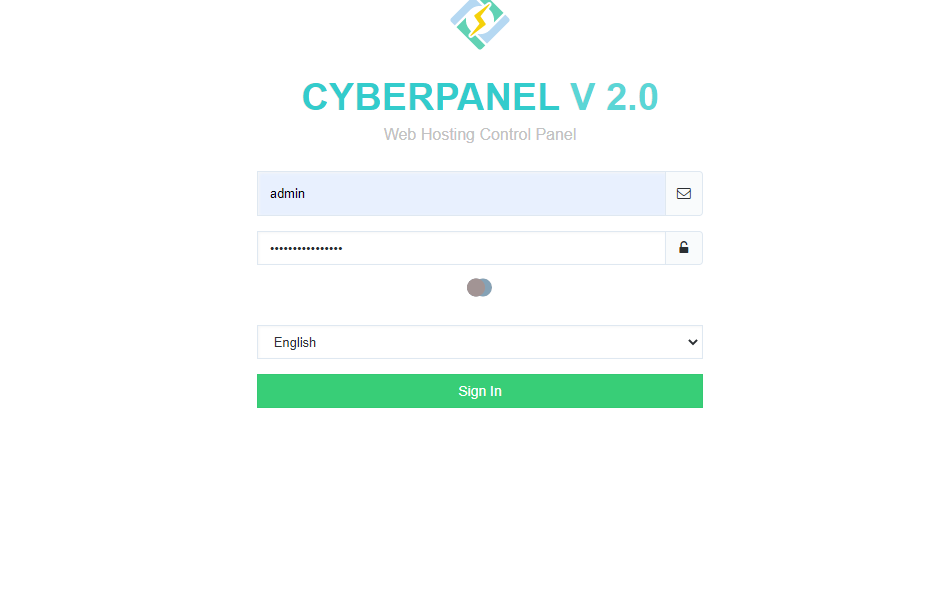
Login to your cyberpanel on port 8090.
https://<YOURIP>:8090
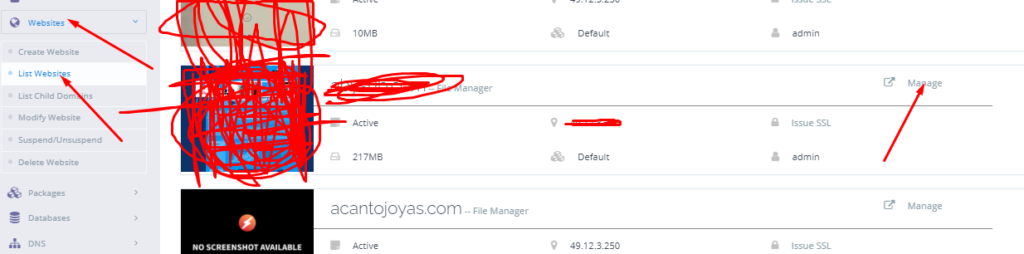
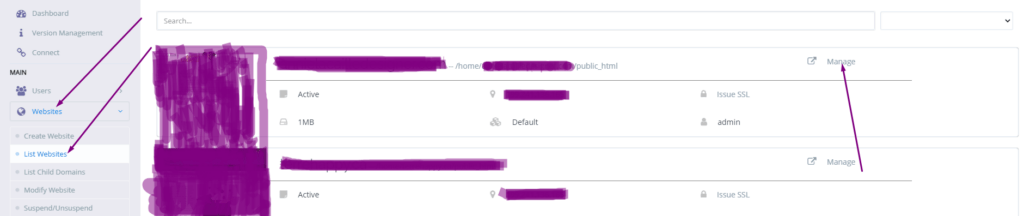
Got to the website->list websites then click on Manage button present in front of your domain which have issue.
Manage Website
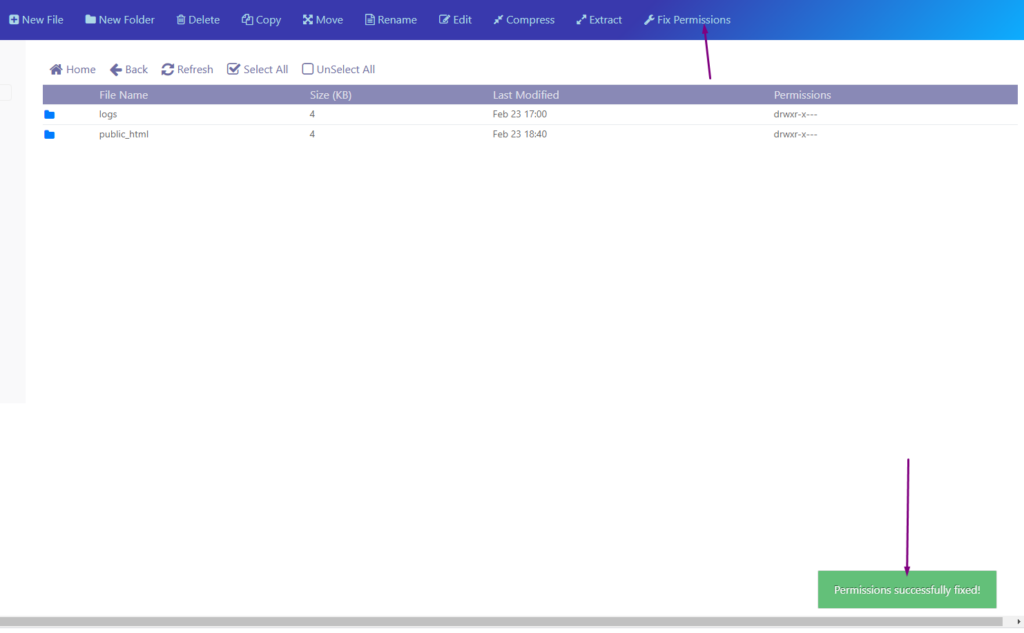
Scroll down and find file manager click on it and here you will find fix permissions button click that a green pop up appears.
fix permissions
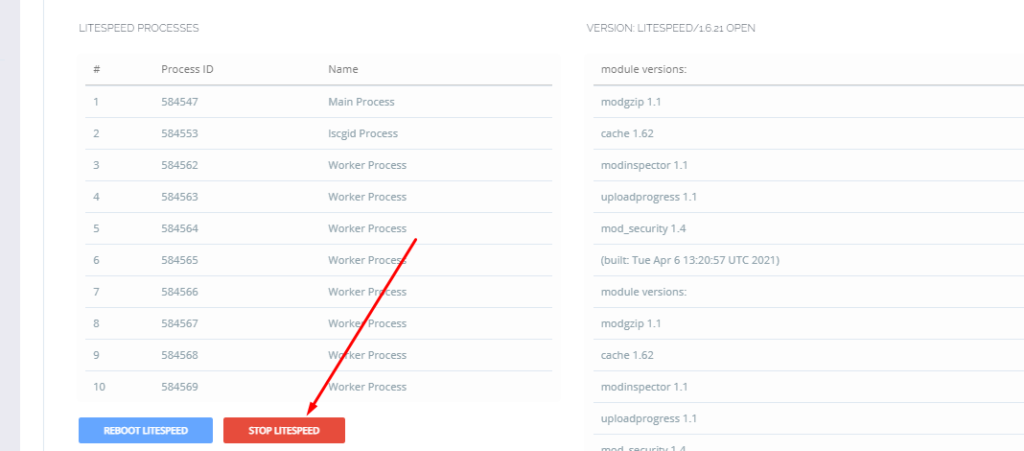
2. Restart LiteSpeed Webserver
After doing all restart the Open liteSpeed webserver. You can do it two way one through command.
Systemctl restart lsws
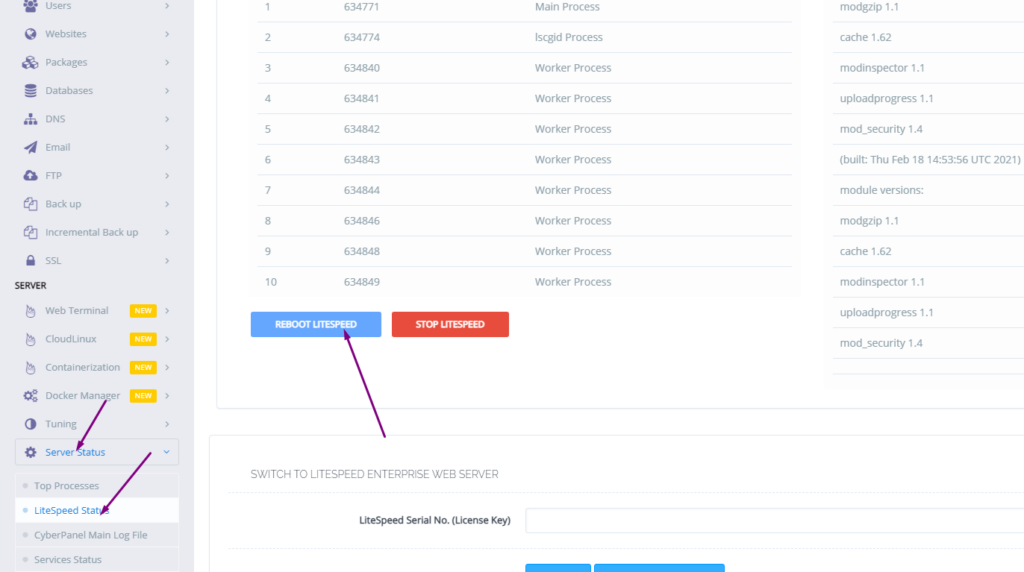
.Or go to the Server status-> LiteSpeed status and press restart.
How to change time zone on Linux server using command line?
In this article, we will know How to change time zone on a Linux server using command line. This is a very easy and a few steps process so follow along to change your time zone according to your need.
The Time zone is the standard time for any specific region. The server time zone is a basic and one of the important things. Server time zone set while installing and setup server. Sometimes we need to change our server time zone according to our requirements. There are many ways but here we will go through command line one. This is one of the easy ways while using Linux.
How to check Current TimeZone of your server?
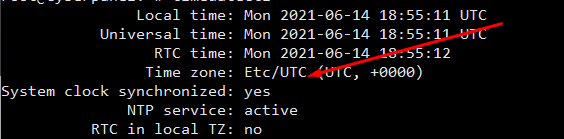
Before changing your server time zone first of all you must know what is the current time zone of your server to do so you just need to run a very simple command. This command is available in all Linux flavors.
open terminal and run:
$ timedatectl
How to check Current TimeZone of your server?
You can see your current time zone of your server.
2. Set / Change Time zone on Linux Server Using Command line:
Before changing your time zone first of all you must have to know about the time zone you want to set. Like if you want to set somewhere in Asia. you must have to know about your region and cit. Now, how you can do it.
For this there is a command to list all time zones:
$ timedatectl list-timezones
List all time zones
Select your required time zone from the list and add it to this cmd.
timedatectl set-timezone “you time zone”
Make sure that you are login from root account if not use sudo with this.
$ sudo timedatectl set-timezone <your specific time zone>
set time zone
After running this run the timedatctl again and verify if time zone updated or not.
$ timedatectl
Now you can see time zone that you set using above methode.
NOTE: Time zone is one of the core important things many features and services depend upon it so before doing anything make sure that you understood all. moreover, you just need a reboot to apply a new time zone on all servers.
Sometimes we need to log in to the rainloop dashboard to do some configurations. Here in this article, we will tell you how to log in to rainloop admin dashboard?
Rainloop is an efficient memory webmail solution. it is a fast, simple, and modern web-based client email client. Rainloop is the email solution that comes with CyberPanel. It has an amazing user interface. Not only the interface also works great as any other email service.
RainLoop Admin Dashboard access address:
To access rainloop dashboard you just need to go to.
A lot of users install ImunifyAV but after some issue, if they want to uninstall they do not know how to do this. Here in this article, we will tell you How To Uninstall Or Stop ImunifyAV?
ImunifyAV – an intelligent antivirus and security monitoring tool for websites with one-click automatic malware cleanup, domain reputation monitoring, and blacklist status check. Read more about ImunifyAV
A lot of users install ImunifyAV but after some issue, if they want to uninstall they do not know how to do this. Here in this article, we will tell you How To Uninstall Or Stop ImunifyAV?
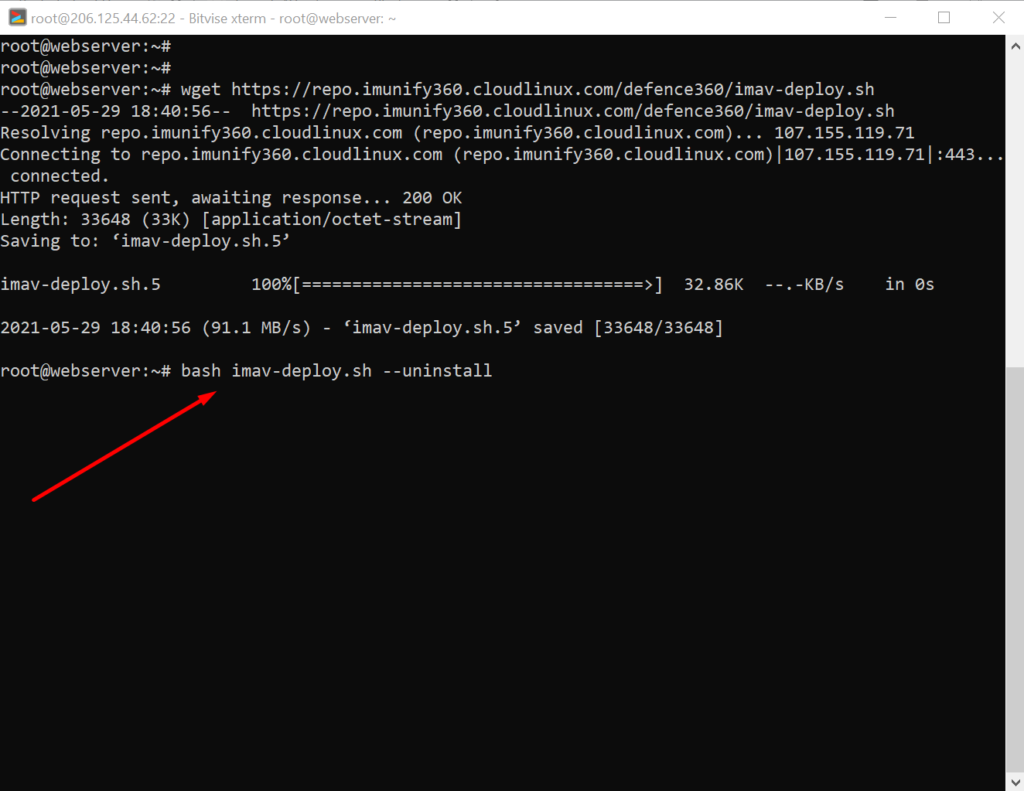
In this artical we provide the way where you can able to uninstall or Stop ImunifyAV.
Uninstall ImunifyAV:
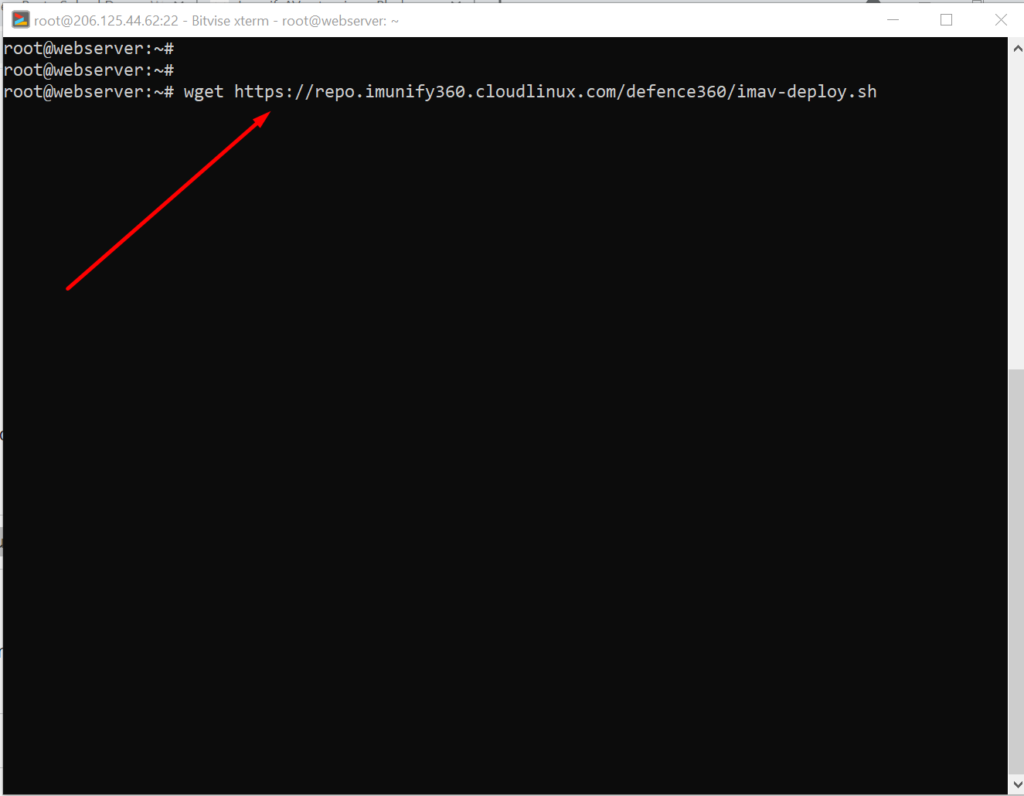
To uninstall ImunifyAV, you need to first download the imav-deploy.sh script with the following command:
How to solve the can’t upload the file on file manager issue in CyberPanel?
if you are uploading a file on file manager in CyberPanel. and getting some error there. Follow this short solution for can’t upload the file on CyberPanel file manager.
Solution
There is very easy and short solution for this issue. Access your root through Bitvise or putty open your terminal(CLI) and run this Command
Systemctl restart lscpd
This simple command will restart all of your CyberPanel services and now if you can try you can easily upload any file but there may be upload limit issue if so you can follow this tutorial to solve that Link below.
How to fix Fix WordPress 404 permalink OpenLiteSpeed- 404 error on OpenLiteSpeed
If you host your WordPress websites with OpenLiteSpeed you may get a 404 error on the permalink of your website. here in this article, I will explain how you can fix ix WordPress 404 permalink OpenLiteSpeed.
OpenLiteSpeed is the free version of LiteSpeed Enterprise and this free version is not as stable as the paid version. Not OpenLiteSpeed WordPress permalink often gives 404 error. When you move site from one server to another or made any change this error comes up. Here i will discuss few methods to solve this issue.
Methods to fix WordPress 404 permalink OpenLiteSpeed:
Method 1 Fix Permissions:
If you are using CyberPanel and you did any change of website after that 404 error come to the site you can fix it by doing few thing.
Fix permissions from the file manager
Restart OLS
Fix Permissions from the file manager:
To fix permission you have to log in to your cyber panel then go to the Websites-> List website select the domain for which you have to fix the issue then press the Manage button present in front of the website.
Manage Website
On the Website Dashboard you can see File Manager press to access the file manager.
File Manager
In file manager click Fix Permission button and you can see the success massage in green color.
Fix Permission
After doing all now its time to restart OLS.
Restart OpenLiteSpeed:
To restart OLS from CyberPanel you have to go on Server Status ->LiteSpeed Status and then you see two-button shutdown and reboot. Press the Reboot button and you can see a success message.
Restart OpenLiteSpeed:
Method 2 htaccess:
An other reason is the missing rules in htaccess for WordPress. To check htaccess rules. Go to the Public_html folder of the website. If you have CyberPanel go to the Website->List Websites then press Manage button.
Then go to the file manager from the Website Dashboard.
File Manager
In file manager open and open .htaccess file and see if there is rules or if the file is empty.
If you want to create a Database in CyberPanel. And do not know how to do this you are on right place read this article to know how you can create a new DataBase on CyberPanel for your Website.
Table of Contents:
Login to CyberPanel
Create New Database
Access Database
Login to CyberPanel:
First of all visi the CyberPanel login URL to login to your CyberPanel it must be with port 8090, Look like:
https://<somainname/IP>:8090
Provide username and password and login to your CyberPanel dashboard.
CyberPanel Login
Create New Database:
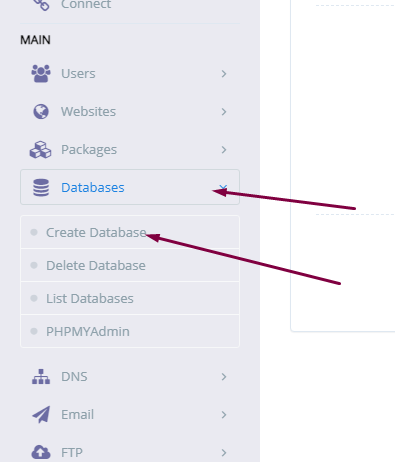
Once you logged in go to the Database->Create Database: in the left menu.
Create New Database
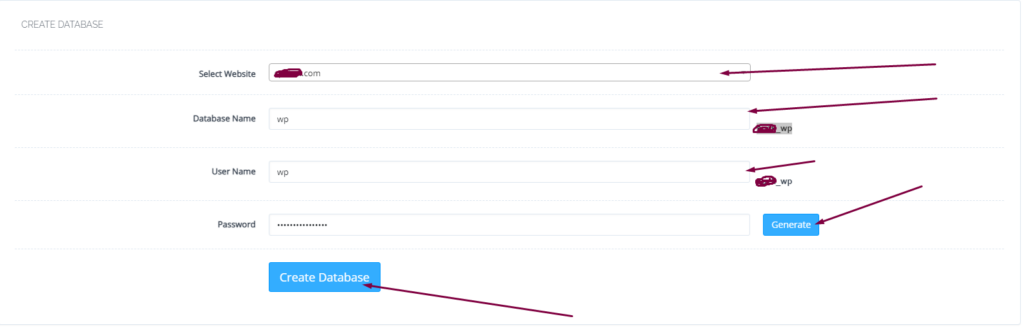
On this create database page you have to select the domain for which you want to create a new database.
select domain
Now screen ask you to provide the details for database.
Username
Database name
Password
Provide the Details for Database
When you press Create Database button this will create a new one for you on your server.
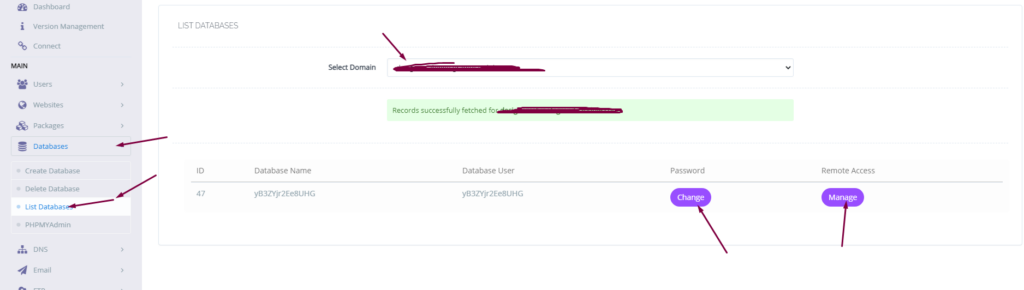
you can also list the database for any of your site on sever from Database-> List Database then select the domain and you can see the list.
list database
Access Database:
To access your database you created you have to go to Database-> PHPMYADMIN. Then press Access Now button.
You can see the PHPMyAdmin screen now. Where you can see all database for all domains. You can check the database your created and do any operation you want to do on this database.
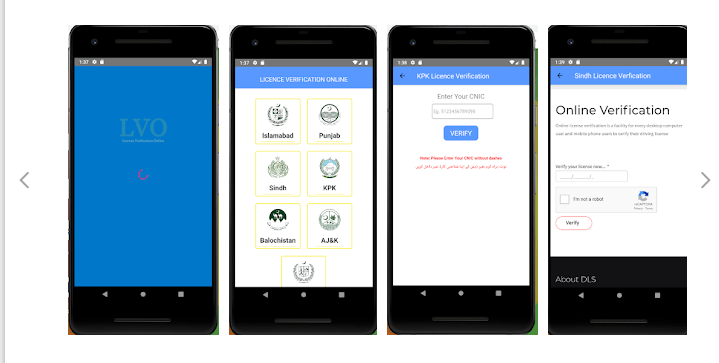
Do you want to verify your driving license online? Do you want to Download the Driving License Verification Pakistan android application to verify your license from your phone? You are in the right place.
Today we bring an android application for you to verify your license from your android mobile phone easily.
No need to visit anywhere just add the required information and verify your driving license from your phone.
Online Driving License Verification Pakistan
Driving License Verification Pakistan is an application for the verification of your driving license online.
This application is built by Solo Doco developers for the easiness and to help people check and verify their driving license online from anywhere.
the process of checking the validity of your license totally depends upon the area you are from. For some area, you can check the license using CNIC and for some, you can check using both CNIC and the License number.
To verify all these you just need to add your CNIC or License number in the box and everything is in front of you. This application helps you to check the Validate date and apply for next also. If you applied but not revived you can check and if data is there in the Application you can ask them for your license.
Main Features
1. Islamabad verification: 2. Punjab verification: 3. Sindh verification: 4. Balochistan verification: 5. KPK license verification: 6. AJK verification 7. GB verification In some, we are using the review of Websites and some do not have their online system so we are using their contact numbers only.
Contact Them:
In case of any query or suggestions about my Privacy Policy, do not hesitate to contact us at solveddoco@gmail.com.
Download Driving License Verification Pakistan From Play Store:
This application is totally free for users. Just download it from play store and use.
How to check any SIM Number Details Online? SIM Number Details Android Application
Do you want to know the SIM Number Details of any number? Are you disturbed by the annoying and wrong calls? Is there someone who constantly annoying you?
If you want to know the information of any number you can download this SIM Number Detail application from the play store and check the number today.
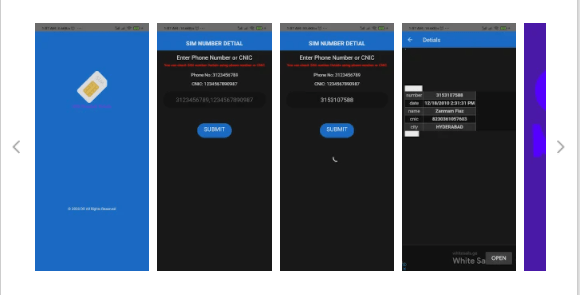
SIM number detail is a free app using this app you can check any sim number information from your mobile phone.
SIM Number Details
If you are annoyed with the wrong callers and want to know the owner of that sim number download this SIM number details application and check today.
You just need to provide the number of the sim without 0 (zero) and details are there. You can see the CNIC, Address, Other numbers, etc.
The data on this application is taken from a domain that is publicly available. This data is old from 2015 new data will be available soon once they updated.
You can also check the SIM owner by using any CNIC number. Through this app, you can check the records using the phone numbers as well as CNIC. Features In-app:
1. Easy to use (User-friendly GUI)
2. Check details using CNIC or phone number
3. Details including address, phone number, etc.
Maybe some information is not up to mark as information is old.
DISCLAIMER:
This is a free application. Data presented in it taken from the website which is publicly available. The author of this application assumes no liability or responsibility for any errors or omissions in the content.
Download SIM Number Details Application From Play Store :
This application is free and online download and use now. The data presented in this application is old and for some specific regions.